
How it worksNCRs

Raise it at the checkpoint. Close it with sign-off.

The work that went wrong is the work they’ll ask about. When something fails an inspection, the fix isn’t the hard part. Proving it is – what was agreed, and what the rectification looked like. CONQA keeps the whole NCR in one record, tied to the lot or element it belongs to.

Where your NCRs live today.

A Word template someone found on the server. The client’s approval, somewhere in an email thread. Rectification photos on the foreman’s phone. By handover, someone is rebuilding the story of a non-conformance from three places. And in year eight, when the panel or the lot gets questioned, that scattered trail is the whole defence.

A concrete pour on a civil site

The fix happened on site. The paperwork for it is wherever the file was last saved.

One record, from raised to closed out.

Five stages, each held against the lot or element the work belongs to. Field set and mandatory fields are configured once for your account and apply on every project.

1. Describe the problem

Raised against the lot or element, so it sits beside the ITP and the inspection that found it.

2. Propose the corrective plan

What the fix is and who’s responsible for it.

3. Record the approval

Attach the client’s sign-off in whatever form it came – an email, a signed letter, meeting minutes. The record shows what was agreed and when.

4. Attach the rectification evidence

Photos and files of the completed fix.

5. Close it out

Signed off as complete, and findable in the register, the ITP and the handover report.

A non-conformance handled well is worth proving.

Findable when the client’s rep asks.

The NCR register shows every non-conformance across your jobs. Filter by status, by responsible person or by what’s still outstanding, and download it as a spreadsheet. Each NCR also shows in the ITP, lot and element views, next to the work it belongs to. In the QA handover report it’s flagged inline at the checkpoint and listed in full at the end. Any single NCR exports as a PDF when someone asks for it.
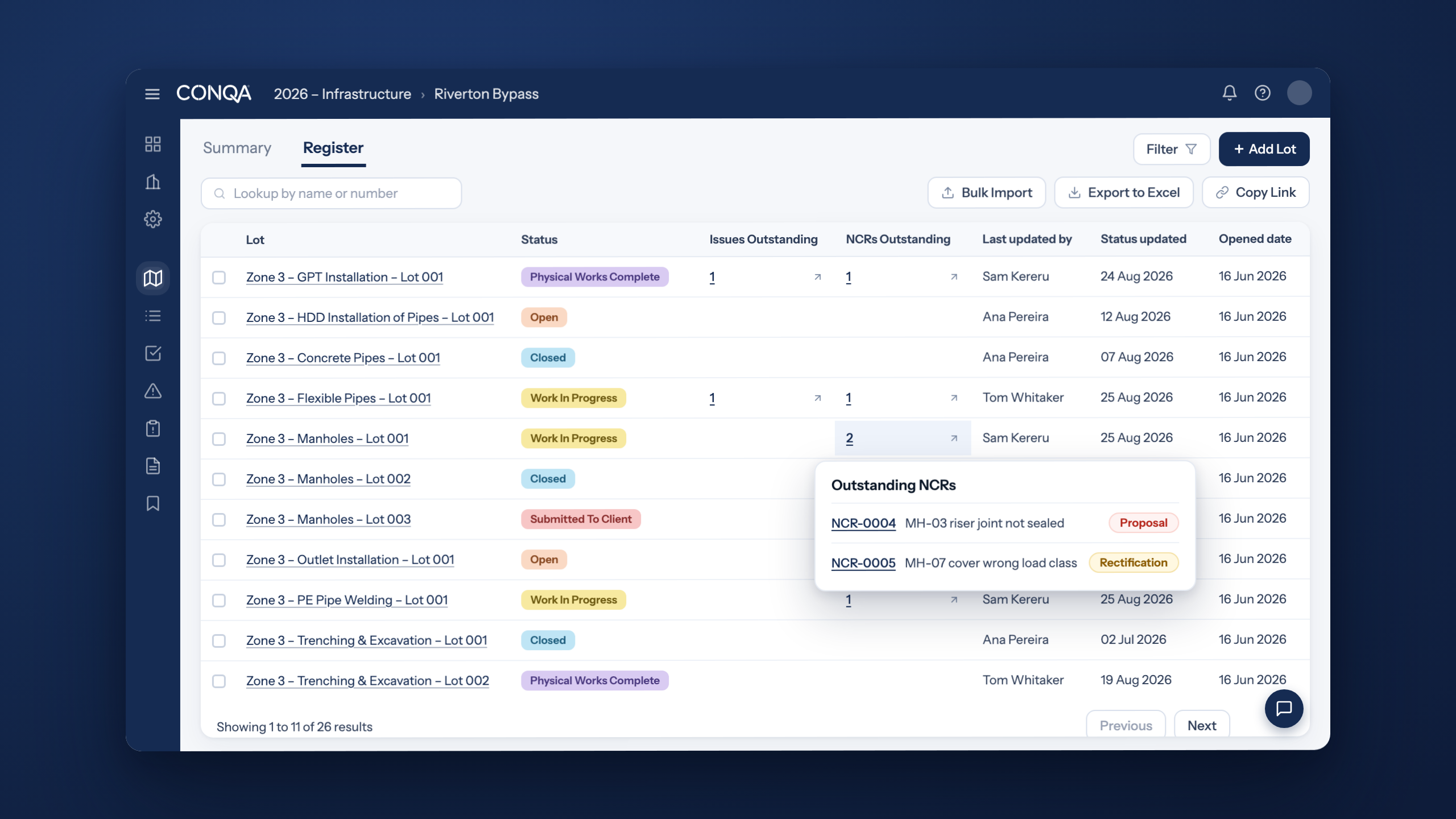
The CONQA lot register with an NCRs Outstanding column, showing the open NCRs on a lot.

Outstanding NCRs show on every lot in the register.

Your client approves the way they already approve.

CONQA records the approval. It doesn’t route it or chase it. Your client signs off however they sign off – by email, on a signed letter, in a site meeting – and you attach that evidence to the NCR. So it fits whatever process the principal or the engineer’s rep already runs. If your NCRs sit in Word, Excel or SharePoint today, this is where they go instead.

A precast panel being lifted by crane

Approved on site, in the meeting or by email. The evidence goes on the NCR either way.

Common questions

What is an NCR in CONQA?

A non-conformance report (NCR) in CONQA is the client-facing record of work that failed an inspection or didn’t meet specification. It holds the problem, the corrective plan, the client’s approval, the rectification evidence and the close-out, all against the lot or element the work belongs to.

Is an NCR the same as an Issue?

No. Issues are internal – your team’s defect list, never shown to a client. An NCR is client-facing: the client’s approval is recorded and the NCR goes into your QA handover report. They’re separate records, and an Issue can’t be converted into an NCR.

Does CONQA manage the approval process?

No – it records it. There are no automated approval emails or in-app approval routing. Your client approves however they normally approve, you attach the evidence, and the NCR holds what was agreed and when.

Can I see NCRs on mobile?

Yes – NCRs show against their lots in the CONQA app. The full NCR register, with its filters and spreadsheet download, is on desktop.

Where do NCRs show up at handover?

In the QA handover report. Each NCR is flagged inline at the checkpoint it relates to, and the full list is appended at the end. Any single NCR can also be exported as a PDF.

How much do NCRs cost?

NCRs are included in all current CONQA plans. Pricing scales with the size of your operation – request pricing at conqa.com/get-started.

When the work is questioned, the record is already there.

See an NCR go from raised to closed out on a demo project.